← All work
( Case study 05 · Wealth tech · Julius Bär India )

Julius Bär HNI

A wealth and trading app for Julius Bär’s high-net-worth clients in India, and the families and managers around them: one view of every portfolio, research to act on, and trading across equity, F&O, mutual funds and IPOs.

Client
Julius Bär India
Role
Design lead · led the team
Platforms
iOS · Android · Tablet
Status
In development
3personas: HNI, HNI family, manager
4asset classes in one portfolio view
2themes: light and dark
2form factors: phone and tablet
( Who we designed for )

Three people, one family’s wealth

Derived personas from the UX approach: the client, the family around them and the manager who runs it all.

RM

Rahul, 39

Family-office manager
“I run several family portfolios. I need one place to see risk and act fast.”
Goals
  • Switch between client accounts
  • Execute across portfolios quickly
Frustrations
  • Data scattered across tools
  • Slow, multi-step execution
Designed for them: Select client · Trade-first
SC

Siddhesh, 48

HNI client, entrepreneur
“Tell me where I stand in ten seconds, then show me why.”
Goals
  • See net worth and XIRR at a glance
  • Research he can act on
Frustrations
  • Reports that need a call to explain
  • Generic market noise
Designed for them: Portfolio card · JB Ideas
PC

Parul, 44

HNI family member
“Our wealth sits with different advisors. I want to see the whole family.”
Goals
  • Family and individual views
  • Reach the RM team quickly
Frustrations
  • Fragmented statements
  • Not sure who to call
Designed for them: Family view · RM support
( The problem )

Wealth that lived
in PDFs and
phone calls

Julius Bär India’s clients hold equity, F&O, mutual funds, PMS, AIFs, bonds and alternates, often across several family members and entities. Understanding performance meant statements, reports and calls to a relationship manager, while trading happened somewhere else. The brief: one app that shows the whole picture first, explains it, and lets clients act on it without leaving.

What clients and RMs told us

01

No single view of wealth

02

Family data scattered

03

Research and trading apart

( Approach )

Three promises
for the redesign

01

Value first

Net worth, gains and XIRR lead every screen; services follow.

02

Built for the family

Switch between individual, family, family-office and business views, or between client accounts, in one tap.

03

Trade-first, RM close by

Every insight has an action beside it, and the relationship team is one tap away.

( Information architecture )

Five tabs, from net worth to the next trade

IA feature mapping started from the dashboard: utilities, portfolio snapshot, market intelligence, screeners and research. The app then splits into Portfolio to understand, Invest to act and Statement to prove it.

Julius Bär HNI app
Sign in
Mobile + SIM checkOTPPassword / MPINFace IDSelect client
Home
Portfolio cardWatchlists & JB IdeasInvestment opportunitiesMarket snapshotFeed & loan summary
Portfolio
EquityFixed incomeCashAlternateFund house exposure
Invest
Direct equityF&O + option chainMutual fundsIPOPMS / AIF
Statement
TransactionsRealised G/LIncome statementContract registerBank book
Markets
Market moversFII / DIIBulk & block dealsScreenersNews & research
More
Profile & nomineeFunds & bankPledgeSecurity settingsRM support

Bottom bar: Home · Portfolio · Invest · Statement · More

( Key flow )

Bank-grade sign-in that still feels quick

The app binds to the device by sending an SMS from the client’s own SIM, then asks for a password and biometrics. Managers and family heads choose which client account to open; first-timers get five short coachmarks.

Mobile number
SIM + SMS check
MPIN / Face ID
Yes → pick the accountMultiple
clients?
No → straight in
Select client
Dashboard +
coachmarks
( Early concepts )

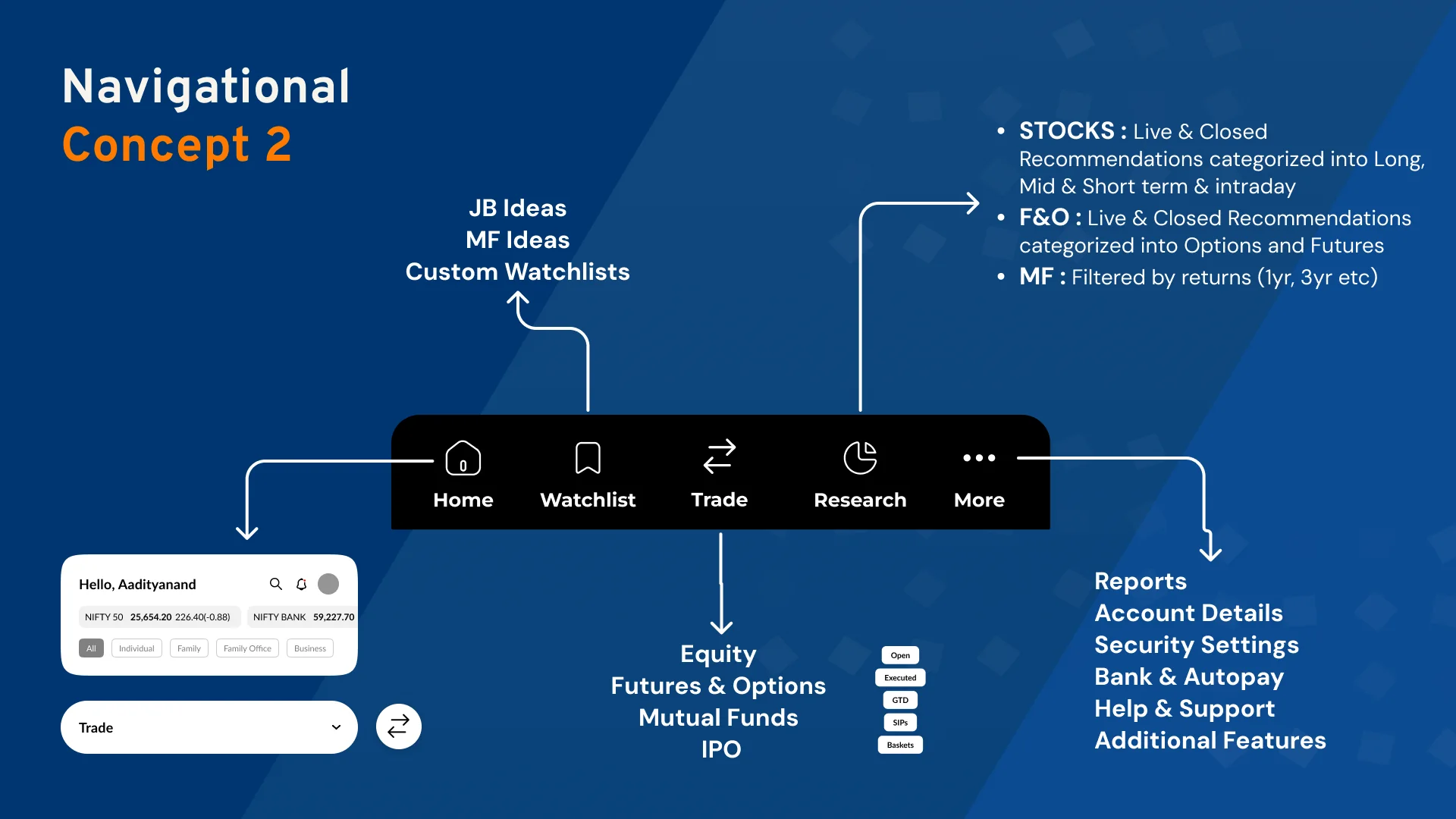
Two ways to navigate,
tested before UI

We compared a Markets-led bottom bar with a Research-led one, mapping where equity, F&O, MF and IPO, reports and account settings would live, before settling on Home, Portfolio, Invest, Statement and More.

Two ways to navigate,
tested before UI
Navigation concepts
( Design highlight 01 )

Where you stand, in one card

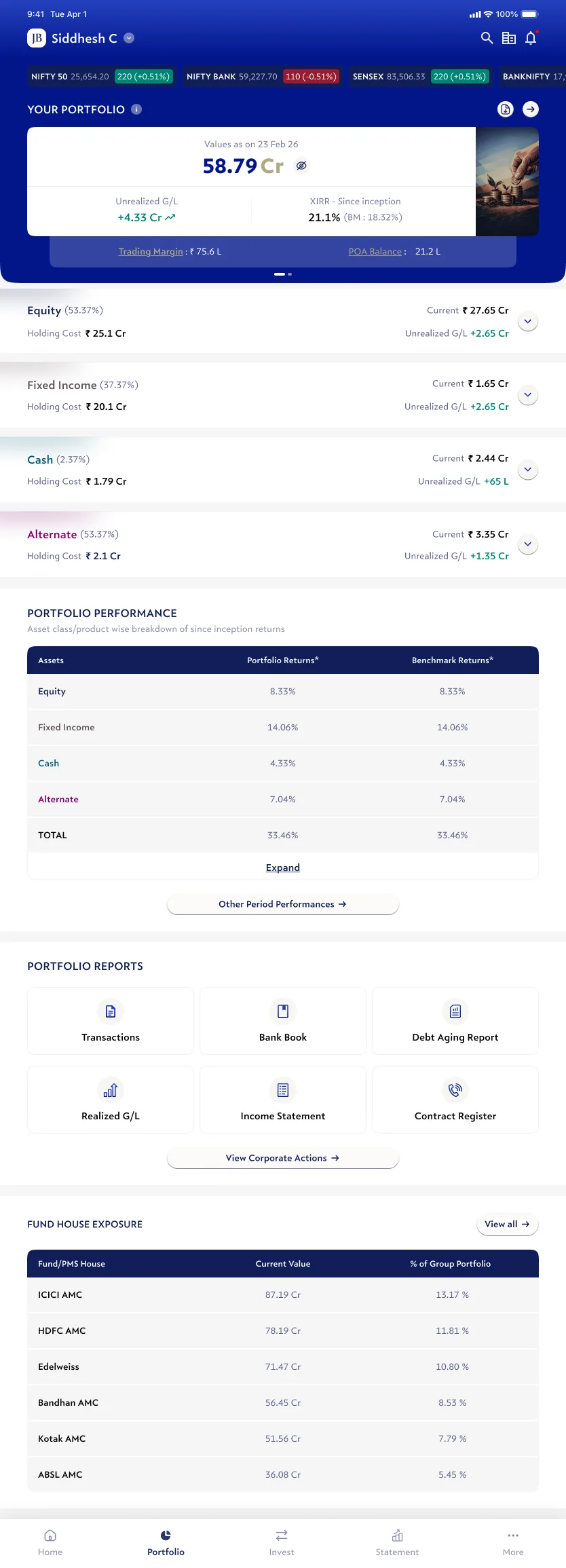
Current value, unrealised gains and XIRR against the benchmark sit in one card, with trading margin and POA balance beneath. Watchlists, opportunities and the market snapshot follow.

Where you stand, in one card
( Design highlight 02 )

The whole portfolio, explained

Equity, fixed income, cash and alternates with holding cost and gains, a performance table against benchmarks, and reports like realised G/L and income statements one tap away.

The whole portfolio, explained
( Design highlight 03 )

Trade without leaving

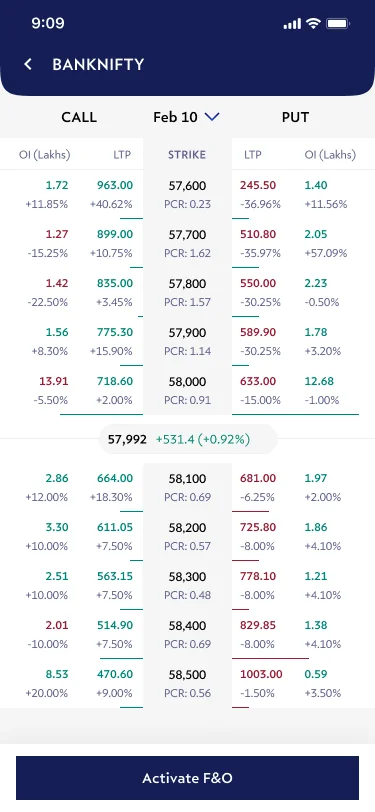
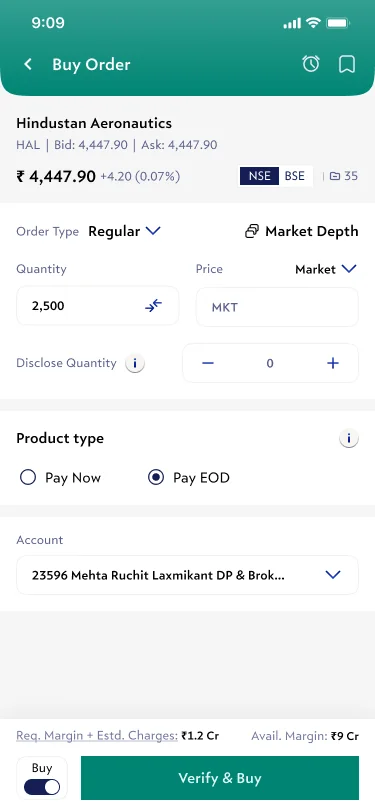
An option chain with OI and PCR, and an order ticket that shows margin, product type and the account before you verify.

Trade without leaving
( Design highlight 04 )

Your team, one tap away

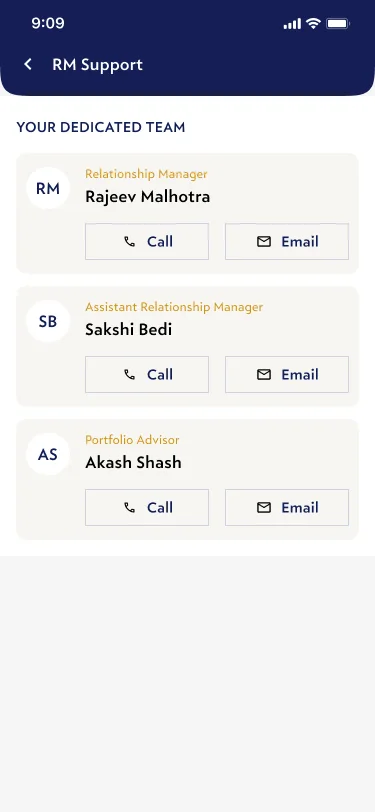
Relationship manager, assistant RM and portfolio advisor, each with call and email, because HNI clients still want a person.

Your team, one tap away
( One system )

Light, dark
and tablet

Built on the Zafire design system with Verlag typography, every screen ships in light and dark, and the portfolio scales to a tablet layout for clients who review at a desk.

Light
Light
Dark
Dark
Tablet portfolio
Tablet · Portfolio
( How it came together )

Process

Benchmark

Angel One Wealth, ICICI Direct, HSBC, Upstox Pro, IIFL, UBS and INDmoney.

Personas & IA

HNI, family and manager; IA mapped for dashboard, MF and F&O.

Concepts

Two navigation concepts and low-fi wireframes.

UI system

Zafire DS, Verlag type, light and dark, phone and tablet.

Build

Buy flows for F&O, MF and IPO, security states and coachmarks; now in development.

( Measuring success )
In build

The app is still being developed, so there are no launch numbers yet. These are the signals that will show whether it works once it ships.

01

Self-serve answers

Questions about performance answered in the app instead of through the RM.

02

Time to first insight

How fast a client sees net worth, gains and XIRR after signing in.

03

Trade completion

Orders placed from research and watchlists without dropping off.

04

Family adoption

Family members and managers actively using account switching.

Status: in development · prototype available