← All work
( Case study 03 · Healthtech · Philippines · MediCard, an AIA company )

MediCard MedGo

A Filipino health-card app for members of MediCard Philippines, an AIA company. Designed by our team in India, shaped hand in hand with MediCard’s team in the Philippines, so every flow, word and error state felt local.

Client
MediCard Philippines
Role
Design lead · small team
Platforms
iOS · Android
Status
Beta · focus group
2countries, one team: India × Philippines
7services one tap from home
13dashboard iterations, reviewed with MediCard
Betapositive focus-group feedback
( Who we designed for )

Three Filipinos, three reasons to open the app

Proto-personas built with MediCard’s Philippine team from member feedback, hotline themes and remote workshops.

MC

Maricel, 34

HR officer, member since 2019
“I just want to know my LOA is approved before I leave for the clinic.”
Goals
  • Get an LOA without calling the hotline
  • See approval status at a glance
Frustrations
  • Long hotline queues
  • Paper forms at the hospital desk
Designed for them: LOA requests · Status tracking
JR

Jun, 41

Father of two, both dependents
“My kids are on my card. I need to file for them too, quickly.”
Goals
  • File reimbursements for dependents
  • Keep every claim in one place
Frustrations
  • Retyping the same details
  • Not knowing why a claim bounced
Designed for them: Reimbursement · Dependents
JS

Joy, 26

BPO night-shift worker
“I’m awake at 3 a.m. I need a doctor who’s awake too.”
Goals
  • See a doctor after her shift
  • Find accredited clinics nearby
Frustrations
  • Patchy mobile data
  • Getting logged out mid-task
Designed for them: Telemed · Retry & offline states
( The problem )

A health card
that still needed
a phone call

MediCard members could see a doctor almost anywhere in the Philippines, but everything around that visit, from getting a Letter of Authorization (LOA) to filing a reimbursement or finding an accredited clinic, still ran through hotlines, emails and paper forms. MedGo 2.0 had to move all of it into one app, for people whose language, habits and network conditions our team in India didn’t share.

What members told the PH team

01

LOAs by hotline

02

Reimbursements on paper

03

Connections that drop mid-task

( Designed in India, for the Philippines )

We weren’t the users, so we didn’t guess

MedGo is a Filipino product. Our team sat in India; the people using it lived in the Philippines. So we ran the project with MediCard’s local team as co-designers, not just approvers.

01

Remote workshops

Regular sessions across the two-and-a-half-hour time difference, walking flows with MediCard’s operations and member-services teams.

02

Member voice, relayed

The PH team brought in hotline themes and member complaints, took builds back to members, and returned with what they heard.

03

Every word, reviewed

All microcopy was reviewed by Filipino colleagues before handoff, so it read naturally, politely and reassuringly to members.

India

DESIGN, IA, UI · OUR TEAM
+2H 30MONE PRODUCT TEAM

Philippines

MEMBERS, OPS, COPY REVIEW · MEDICARD
( Local by design )

Warm words, local habits, patchy data

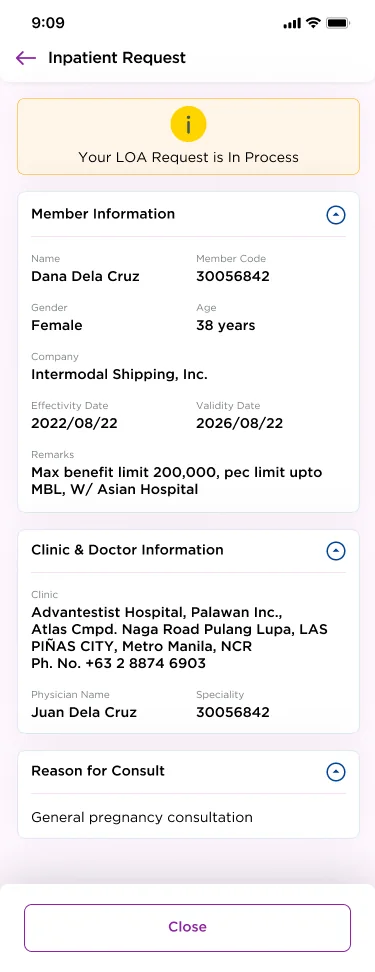
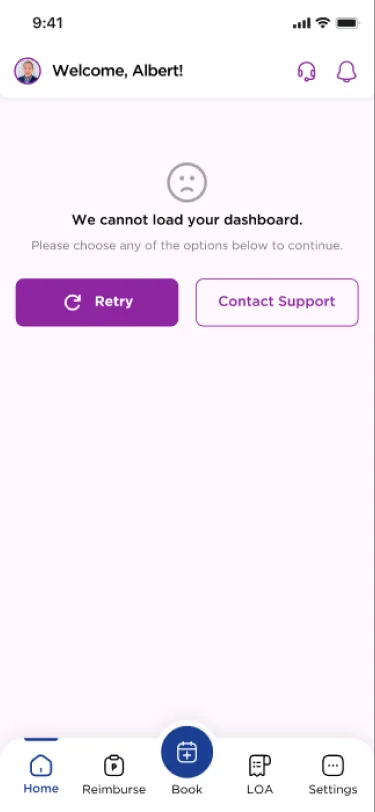
Statuses like Disapproved or Action Needed are written to reassure, never to blame. Local conventions such as LOAs, dependents, peso amounts, barangay-level addresses and birthdate passwords were designed in from day one. And because data can drop at any time, every screen knows how to retry.

Straight from the app

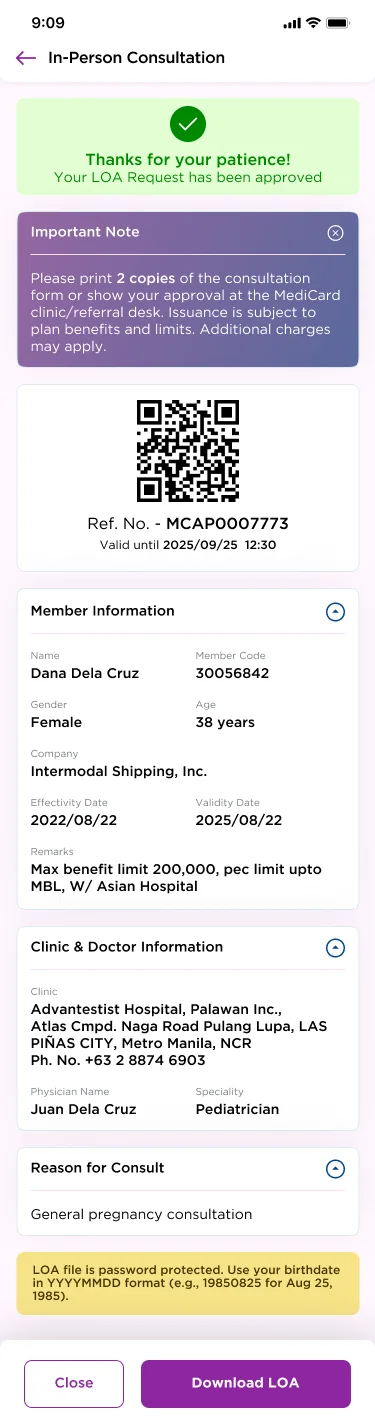
“Thanks for your patience! Your LOA Request has been approved.”
“Download requires internet. Please retry when connected.”
“LOA file is password protected. Use your birthdate in YYYYMMDD format.”
Retry state
LOA in process
( Approach )

Three promises
for the redesign

01

Skip the hotline

LOA requests, approvals and QR codes in the app, ready to show at the clinic counter.

02

Room for everyone

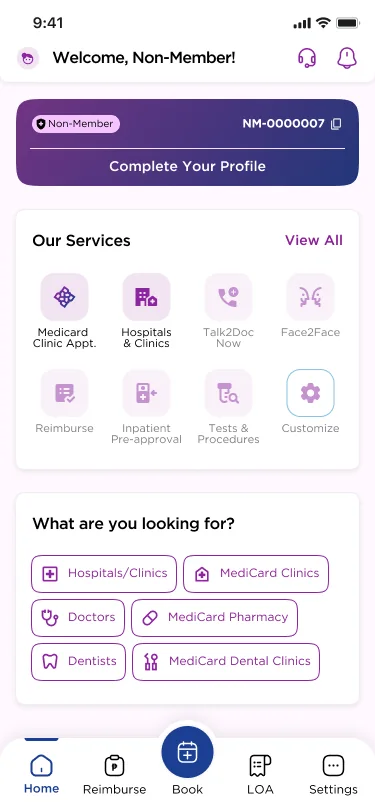
Members see their card and services; non-members can still find clinics, doctors and book.

03

Never a dead end

Every screen has a retry, a saved draft or a route to support when the network drops.

( Information architecture )

Five tabs, built around the visit

We mapped the app to what a member does around a clinic visit: get approval, book, get care, get reimbursed. The bottom bar puts the two most common jobs, Reimburse and LOA, either side of a central Book button.

MedGo app
Sign in
Mobile + OTPBiometric unlockMember or non-memberRegistrationSession timeout
Home
Virtual ID + QROur servicesCustomise servicesPerks: Face ScanWhat are you looking for?
LOA
In-person consultTests & proceduresInpatient requestTeleconsultationMaternityLOA history
Reimburse
Fill form (4 steps)Upload documentsSave draftTrack statusHistory
Book
MediCard clinicsHospitals & clinicsDoctorsAppointment history
Health
MyPocketDoctorsFace ScanMedical recordsUtilizationTransactions
Settings
Profile & dependentsMobile & emailChange passwordFeedbackDelete account

Bottom bar: Home · Reimburse · Book · LOA · Settings

( Key flow )

An LOA in minutes, not a phone call

Members used to call the hotline for a Letter of Authorization before a consult or test. Now they pick the LOA type, choose the member (dependents included), clinic and doctor, attach a lab request when needed, and follow it to a QR code the clinic can scan.

Pick LOA type
Member, clinic
and doctor
Yes → attach requestTests or
inpatient?
No → submit directly
Upload lab
request
Track: in process
→ approved
Show QR at
the clinic
( Design highlight 01 )

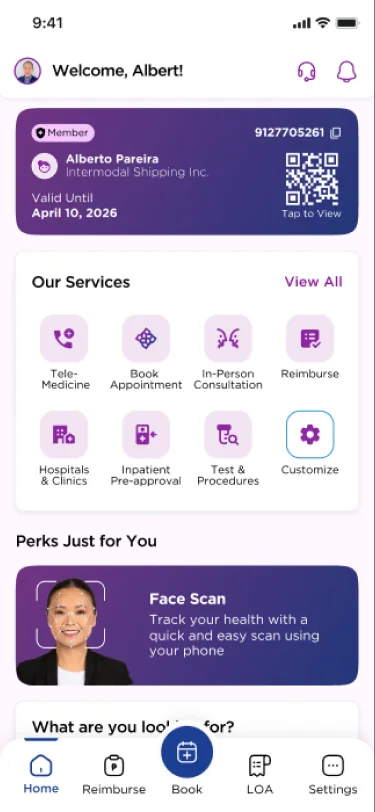
One card, one home

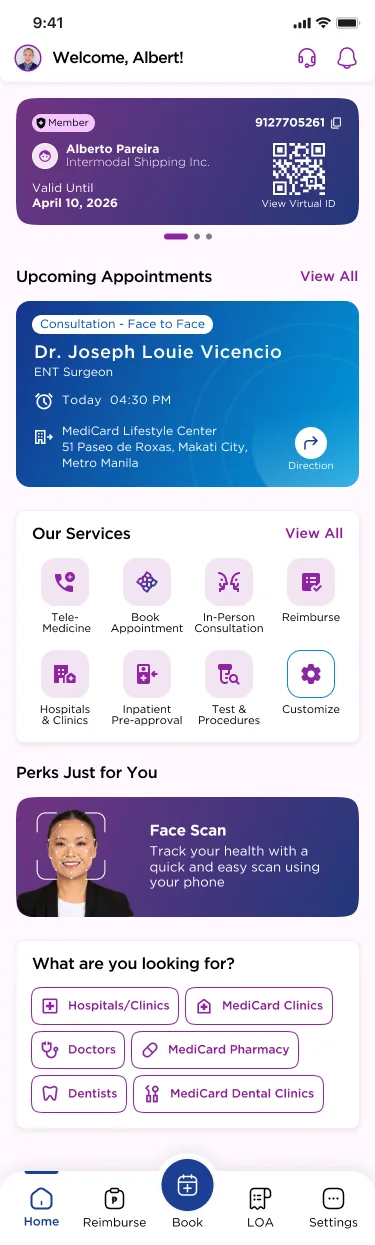
The virtual ID sits on top with a QR to show at reception. Every service is one tap below it, and members can choose which services they see first.

One card, one home
( Design highlight 02 )

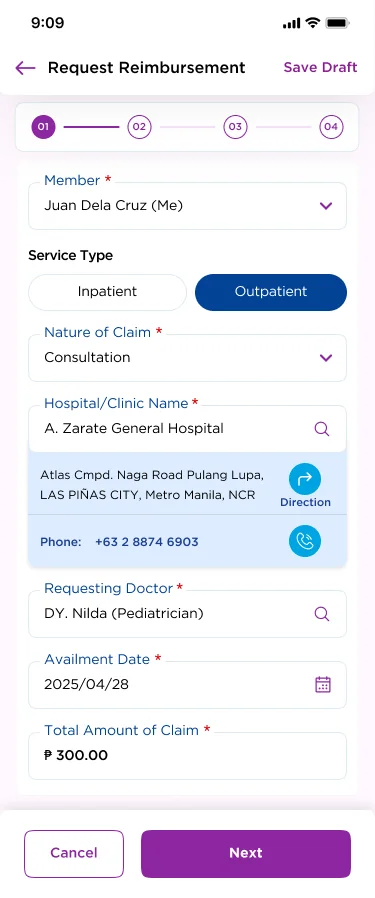
Reimbursement without the paperwork

A four-step form with clinic search, directions and a call button, peso amounts, and a draft you can save if the signal drops. History shows where every claim stands: Released, In-Process or Action Needed.

Reimbursement without the paperwork
( Design highlight 03 )

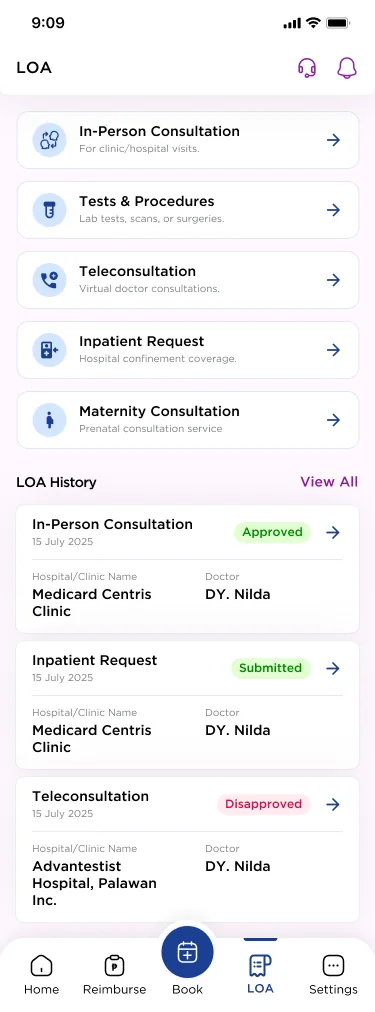
LOA, from request to QR

LOA types match how members think about a visit: consultation, tests, inpatient, telemed, maternity. Approved LOAs come with a QR and a PDF that opens with your birthdate.

LOA, from request to QR
( Design highlight 04 )

Care after hours

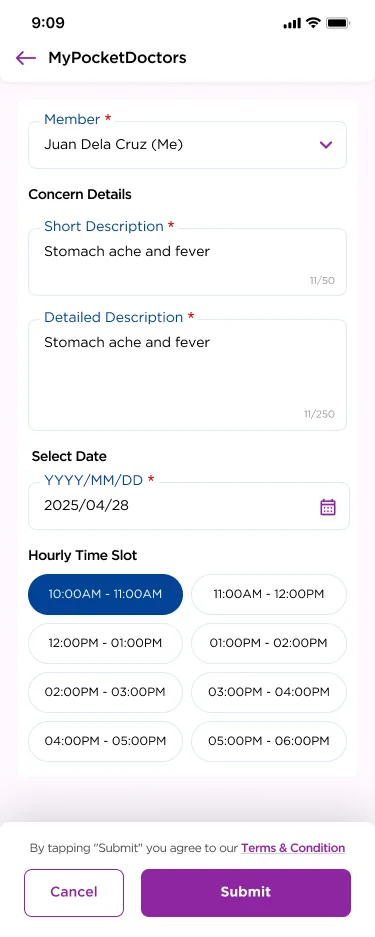
MyPocketDoctors teleconsults offer hourly slots, for members on night shifts or far from a clinic. A quick Face Scan from the phone camera adds a wellness check.

Care after hours
( Iterating together )

13 dashboard rounds,
reviewed with MediCard

Every round of the home screen went to MediCard’s Philippine team for review. Early versions carried appointments, perks and search all at once; the final layout is calmer: the card, the services and one perk, with a separate, lighter home for non-members.

Iteration 8
Iteration 8
Iteration 13 · Member
Non-member home
Non-member home
( How it came together )

Process

Discover

Remote workshops with MediCard’s PH team, plus hotline and member-feedback themes.

Structure

An IA built around the visit: LOA, reimbursement, booking and telemed.

Localise

Tone, copy and local conventions reviewed by Filipino colleagues.

Iterate

13 dashboard rounds and full flows for members and non-members.

Beta

Rebrand to MedGo and focus-group testing through the PH team.

( Measuring success )
In beta

MedGo 2.0 is in beta. A smaller focus group of members, run through MediCard’s Philippine team, gave positive feedback. These are the signals we’ll watch as it rolls out.

01

Hotline deflection

LOA and reimbursement requests filed in the app instead of by phone or email.

02

LOA turnaround

Time from request to an approved QR the clinic can scan.

03

Clean claims

Reimbursements submitted without an “Action Needed” bounce.

04

Resilient sessions

Tasks finished after a retry, offline state or session timeout.